

AI for SaaS: What to Build Yourself and What Not To
You have engineers. So the question is not whether you could build this. It is whether it is the best use of a quarter of their time. This page covers eight use cases, and gives a straight answer on each: build, buy, or leave alone.
15 min read
First
The Four Numbers That Decide This
Each use case below moves one of these. If it moves none of them, it is a demo rather than a project.
Net revenue retention
NRR sets your valuation multiple, and churn prediction and expansion scoring both act on it. Here a single point of NRR is worth a headcount.
Cost to serve, per account
Support tickets divided by accounts, a number that trends the wrong way every year as you grow. Deflection and a good copilot break the link between account growth and support headcount.
Time to first value
How long from signup to a customer getting real work done. It tracks retention better than almost any other number, and onboarding friction is where it is lost.
Engineering time not on the product
Release notes, incident triage, support escalations. Real work that has to happen, but not why you hired the team. Most SaaS firms never count the hours it takes.
The Honest Answer
Build, Buy, or Leave It
You could build all of these. Below is where we think that is a good use of your team, and where it is not.
| Use case | Verdict | Why |
|---|---|---|
| Churn Prediction | Build with help | It runs on your product's own usage semantics, which no vendor knows. But the modelling is new ground for most product teams, so pair on it rather than work alone. |
| AI Support Assistant | Buy, mostly | Existing products do this well. Build only if your docs and ticket structure are odd enough that generic tools do a poor job. That is rarer than teams assume. |
| In-Product Copilot | Build | This is your product, so it needs your data model, your permissions, your semantics. Hand it to a vendor and you hand over a core surface. It will show. |
| Semantic Search | Buy the infrastructure, build the layer | Vector databases and embedding models are commodity now. What is yours alone is chunking, permissions and ranking on your content. |
| Anomaly Detection | Buy | Observability vendors do this well, and it is not what sets you apart. Building your own is a classic engineering-led detour. |
| Expansion Scoring | Build with help | Same reasoning as churn: it runs on usage patterns only you can read. |
| Release Notes | Build, small | A weekend project against your commit and ticket history, useful and hard to justify buying. |
| Lead Scoring | Buy or build, low stakes | Your CRM probably offers it. Build only if product usage signals beat firmographics, which is true for PLG and not much else. |

Churn Prediction & Prevention
Know which accounts are leaving 60 to 90 days out, with the reason attached.
Churn shows in product usage long before renewal. Logins thin out, a power user stops appearing, feature breadth narrows to one workflow. The admin who backed you leaves, which is the strongest signal of all. Customer success spots some of this, but only on the accounts they happen to look at. Those are not the accounts that need it.
A model watches usage, support and billing signals on each account, and flags drift from that account's own healthy pattern. The reason matters more than the score. 'Usage down 40% and their admin has not logged in for three weeks' tells a CSM what to do. A health score of 34 tells them nothing.
The failure we see most is flagging at renewal minus thirty days, when the only move left is a discount. Sixty to ninety days out, a save is still possible.
Signals that actually predict
- Feature breadth narrows before volume drops
- The champion or admin leaves
- Support ticket sentiment, not ticket count
- Time since last action, per product

In-Product Copilot
An assistant inside your product that acts on the user's own data.
A copilot that only answers questions from your docs is a help centre with a chat box. The version that changes anything acts. It builds the report, sets up the workflow, and explains what a number means for this account. It does in one step what the user was about to do in six clicks.
That means access to the user's data and to your product's actions. So permissions are the hard part, not the model. Each action must run as the user, with their exact permissions, and each one is logged. A copilot that can see across tenant boundaries is a breach waiting to happen.
This is the one we most often advise building rather than buying. It is a core product surface, and it needs your semantics, your permission model and your action set. A generic wrapper will feel like one.
Permissions are the hard part
- Each action runs as the user
- Tenant isolation proved by test
- Destructive actions confirmed explicitly, always
- Full audit log, with the actor

AI Support Assistant
Resolve the repeat third from your own docs, and hand the rest over with full context.
Support volume grows with accounts, and roughly a third of it is the same questions, answered from docs that already exist. Deflecting that breaks the link between customer growth and support headcount growth.
The discipline that matters is knowing when to stop. An assistant that tries a hard integration question and gets it wrong costs more than the ticket it saved. The customer is now annoyed, and a human starts from a wrong answer. Be confident on the common third, and hand over at once on all the rest.
Get right
- Escalate early rather than guess
- Ground answers in your own docs
- Pass full context on handover
- Track deflection and reopen rate together

Usage-Based Expansion Scoring
Spot accounts ready to upgrade before the renewal call, not during it.
Expansion is often found at renewal, which is the worst moment. The customer is already weighing options, so any upsell reads as a price rise. The signals appear months earlier. Seats close to a limit, a workflow picked up by a second team, API usage climbing toward a tier boundary.
Scoring surfaces those accounts with the evidence attached. So a CSM opens a talk about a real constraint the customer already feels, rather than making a pitch. It is the same modelling machinery as churn, pointed the other way. That is why the two are often built together.
Signals
- Seat usage near a plan limit
- Adoption spreading to a second team
- Usage pattern matching earlier upgrades
- Support questions about a higher tier

Semantic Product Search
Let users find things by meaning across your product and your help content.
Keyword search fails on the queries users really type. They describe a problem in their words, not yours. Someone searching 'stop emails going out' will not find a feature called 'notification suppression rules'.
Semantic search matches meaning, and the infrastructure is commodity now. Embeddings and vector storage are solved. What is yours alone is three things. How content is chunked, and how permissions are enforced so results never leak across tenants. And how ranking blends relevance with recency and the user's role.
Where the work is
- Chunking, which beats model choice
- Permissions at query time, not after
- Ranking that blends relevance and recency
- Measured against your current search

Anomaly Detection
Catch system problems from metrics and logs before customers report them.
Threshold alerts catch the failures you saw coming, and miss the ones you did not. They also make enough noise that on-call engineers learn to ignore them. That is worse than no alerting, because it looks like cover.
Behavioural detection learns what normal looks like for each metric, including its shape across the day and the week. Then it flags departures. A request latency of 400ms might be fine at peak and alarming at three in the morning. No fixed threshold can say that.
Our honest advice: buy this. Observability vendors do it well, and it is not what sets you apart. Building your own is a detour that feels productive and is not.
Why we say buy
- Mature vendors handle this well
- You will own it at 3am
- Same integration work either way
- Build only for an unusual workload

Lead Scoring & Routing
Rank and route inbound leads by product usage, not just firmographics.
Traditional lead scoring uses company size, industry and job title. For product-led businesses the stronger signal is what the person did in the free tier. Which features they tried, how many people they invited, whether they reached the point where the product becomes useful.
Behavioural and firmographic signals together rank better than either alone. Routing on top of ranking matters too. A self-serve trial that has outgrown the free tier needs a different call from a cold enterprise enquiry.
For PLG, weight behaviour
- Activation events specific to your product
- Team invites and collaboration signals
- Usage against free tier limits
- Firmographics predict deal size, not intent

Automated Release Notes
Notes and changelogs drafted from commits and tickets, for a human to edit.
Release notes are written by a person who would rather be doing other work, often at the end of a release. So they are often late, thin, or skipped.
Draft them from merged pull requests and closed tickets. Group by area, phrase for customers rather than engineers, and filter internal changes out. That turns a writing task into an editing task. Ten minutes instead of an hour, and it actually happens.
This is a small project with a good return and no vendor worth paying. Build it, keep it simple, and have a person edit before you publish.
Keep it simple
- Draft from merged PRs and tickets
- Filter internal refactors and bumps out
- Phrase for customers, not engineers
- Always human-edited before publish; never auto-publish
Where We Specialise
Agents for Work Around the Product
SaaS teams stay small by automating. The work that resists automation is the work that needs judgement across several systems. Building an incident picture, preparing a renewal, working out why an account has stalled in onboarding.
The four below do that assembly. They also show the general rule: an agent is worth building where the gathering is expensive and the deciding is cheap.
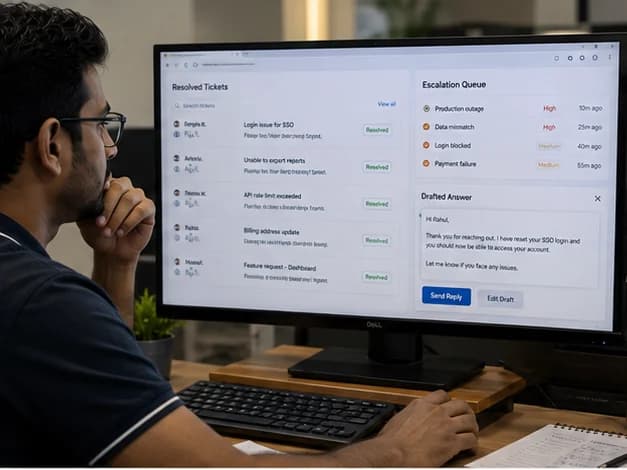
Tier-One Support Agent
Common tickets resolved end to end, including the action and not just the answer.
An assistant answers and an agent does. 'Here is how to reset a user's password' is an answer. Resetting it, confirming it, and closing the ticket is a fix.
The agent handles common requests inside permissions you define. It resets access, changes a setting, pulls a usage report, applies a written policy. Anything outside that set escalates, with the account context, the chat so far, and what it already tried.
The permission boundary is the whole design. Define exactly what it may do, log all of it, and make destructive actions ask a human first.
Boundaries
- An explicit allow-list of actions
- Destructive actions confirmed by a human
- Each action logged, ticket and actor
- Escalate on doubt, never guess

Onboarding Agent
Time to first value is the metric; this is what moves it.
Onboarding is where accounts are lost quietly. A customer who has not finished setup after two weeks is unlikely to renew. Nobody notices until the renewal, because tracking each new account's progress is a job nobody owns.
The agent tracks each account against the activation path that predicts retention. It finds where they have stalled, then acts in proportion. A nudge carries the specific next step. A handover goes to a CSM where the stall looks like a real blocker rather than a busy week.
It also tells you which step accounts stall on most. That is often a product problem worth fixing, not a customer problem worth nudging.
Needs defining first
- What activation means for your product
- The step order that predicts retention
- When a nudge is not enough
- A feedback loop back to product

Incident Response Agent
The incident picture assembled before the on-call engineer finishes reading the page.
An alert fires at three in the morning. The engineer then spends twenty minutes on context. What changed recently, what else is alerting, whether this has happened before, which customers are hit. That is the expensive part of the night, and it is pure retrieval.
The agent assembles it on the alert. Recent deploys and config changes, plus alerts that correlate across services. Past incidents like this one and what fixed them. The accounts affected, and the relevant runbook section. It posts all of that to the incident channel before the engineer has opened a laptop.
It does not remediate, because automated fixes during an incident turn a small problem into a large one. We would not build that without a very specific case.
Assembles
- Deploys and config changes just before
- Correlated alerts across services
- Past incidents and what fixed them
- Affected accounts and who to tell

Renewal Preparation Agent
The renewal brief prepared with evidence, before the call rather than during it.
A CSM preparing a renewal pulls from four systems: usage trends, open tickets, feature requests, contract terms, expansion signals. Done properly it takes an hour per account. At fifty accounts, that means it gets done properly for the largest ten.
The agent prepares each brief on schedule. Usage against last period, with the notable moves called out. Support history and sentiment, and anything still open. Expansion signals with the evidence attached, and a risk read with reasons. The CSM walks in prepared, instead of spending the morning preparing.
Included in the brief
- Usage trend with the notable moves
- Support history and sentiment
- Open feature requests and their status
- Expansion or risk signals, with evidence
Being Straight About It
Worth doing if
- Roughly a hundred accounts and up
- Support volume growing with account count
- Net revenue retention is the metric
- Engineering teams who build selectively
Probably not, if
- Pre-product-market-fit teams; go talk to users
- Under fifty accounts, founder knows everyone
- Teams wanting a copilot as marketing
- Anyone who will not build evals
FAQ
Questions Product Teams Ask Us
For several of these you should, and the table above says which ones. Your copilot and your churn model run on semantics only your team knows. What we add is the parts that are unfamiliar rather than hard. Eval method, retrieval architecture, and which failure modes show up at month three. We would rather pair with your team and leave the skill behind than own something you should own.
Enough churn events to learn from, which is the real constraint. Roughly a hundred accounts is a workable floor. Add a year of history and a fair number of accounts that left. Below that you have too few examples. A founder who knows every account will beat any model, and we would tell you that rather than build it.
Almost certainly not the question that matters. Model choice is the most discussed and least important decision in most AI features. Retrieval quality, permission handling and evals matter far more, and models change every few months anyway. Build so the model is swappable, then pick the cheapest one that passes your evals.
Enforce permissions at retrieval time, rather than filtering results after. Then test it as an attacker would, rather than assuming. Each query runs as the user, with their permissions, and nothing is retrieved that they could not already open. Then write tests that try cross-tenant access on purpose, and run them in CI. This is the one failure that ends a SaaS company, and it deserves that level of paranoia.
Model this before you build, not after. Cost per call times the calls you expect, with a realistic view of how usage grows if the feature is any good. Teams often get this wrong by an order of magnitude. They model average usage rather than the power users who run it all day. Cache hard, and consider a smaller model for the common path.
A commercial question, but the cost structure should inform it. Unlike the rest of your product, this has a real marginal cost per use. So a fully free copilot can invert your unit economics on heavy accounts. Most firms land on wide limits by tier, rather than one extreme or the other.
Deflection rate alone will flatter you. Track three numbers together: deflection, the reopen rate on deflected tickets, and satisfaction on those chats. An assistant that closes tickets by wearing people down shows excellent deflection. The honest measure is tickets resolved without a human, where the customer did not come back.
Ground all answers in retrieved content, and cite the source so the user can check. Make 'I do not know' a fine answer, and a common one. Then evaluate for it: your eval set should include questions your docs do not answer. The right behaviour there is to decline, not invent. A confident wrong answer to a customer is worse than no feature.
Almost certainly, yes. These join at the data layer: your product database, warehouse, support tool, CRM. Postgres, Snowflake, BigQuery, Segment, Zendesk, Intercom and HubSpot are all routine. The more common friction is your product events, which were set up for analytics rather than modelling, so some are missing or unclear.
Your data is yours. You can export it at any time, and we will never hold it hostage. You get the working system, the documentation and the training, so your team can run it day to day. What else transfers at the end of an engagement is set out in the contract, before work starts. Model artefacts, source and licence terms are all named there. So there are no surprises either way. For a SaaS company this matters more than for most clients, so raise it early. Where you want your own engineers to maintain and extend the work, we scope it that way from the start.
Three to five months for something really useful, rather than demoable. A demo takes two weeks. The gap is permissions, retrieval quality, evaluation and cost control, plus the long tail of queries where a naive build lets you down. Anyone quoting six weeks is quoting the demo.
It constrains what is possible, and it is worth fixing anyway. Churn and expansion models depend on knowing what users did. Events that fire out of step across platforms are a problem, and so are events that changed meaning after a refactor. Either way the model learns your instrumentation, not your customers. Often the first phase is an event audit, which pays for itself in analytics alone.
Yes, and the difference is doing versus answering. A chatbot tells a user how to reset a password. An agent resets it, confirms, and closes the ticket. That difference is all about permissions, the actions you define, and audit, which is why agents take longer to build and are worth more.
That is the most common outcome for AI features. It is often a product problem, not a model problem. The feature was built because AI was there, not because a user problem needed it. We would ask what the user does today instead. If the honest answer is 'nothing, this is not a real problem', we will say so. That is better than watching you spend a quarter on it.
Recognise your plant in any of that?
Tell us which problem is costing you most and we will tell you honestly whether it is worth building, what data it needs, and roughly what it costs.
Book a Free ConsultationSee our SaaS & Technology solutions